 OfficeOne Shortcut Manager 9 for PowerPoint Updated
Overview
Shortcut Manager for PowerPoint introduces the keyboard shortcuts
customization feature to PowerPoint. It enables you to:
- Define your own keyboard shortcuts to ribbon buttons, menu items and recorded macros.
- Define your keyboard shortcuts that are active in only certain modes
- Define shortcuts to password protected VBA macros.
- Define shortcuts in Presentation Templates. Presentations created from these templates automatically inherit these shortcuts.
- Define shortcuts to more than 750 commands that aren't available directly through the PowerPoint User Interface.
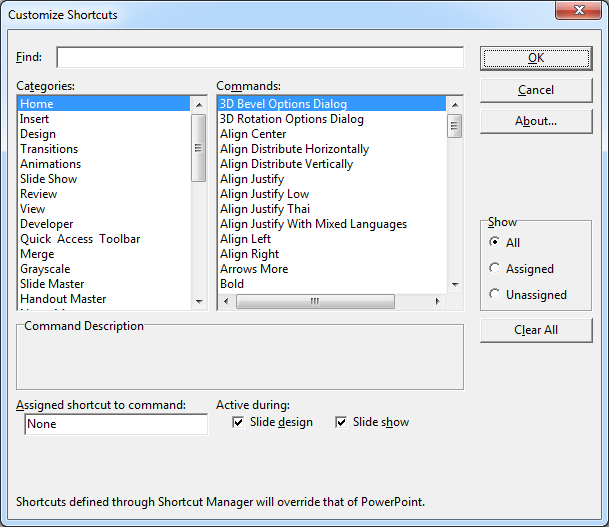
In Home tab, click
Customize button in Keyboard Shortcuts group to get to the Customize
Shortcuts dialog box:
Shortcut Manager for PowerPoint works with
Microsoft PowerPoint 2024 (32-bit, 64-bit),
Microsoft PowerPoint 2021 (32-bit, 64-bit),
Microsoft PowerPoint 2019 (32-bit, 64-bit),
Microsoft PowerPoint 2016 (32-bit, 64-bit) and
Microsoft PowerPoint 2013 (32-bit, 64-bit).
Download the add-in
and install it in your PowerPoint environment. After the add-in is loaded
successfully, you can start assigning shortcuts using the customize shortcuts
dialog. The customize shortcuts dialog can be invoked by clicking Customize
button in Keyboard Shortcuts group in Home
ribbon tab.
Shortcut Manager for PowerPoint also provides an SDK that allows other
add-ins to provide their own shortcuts and make those customizable by users.
Add-In developers who wish to add shortcut functionality to their add-ins
should visit here.
Click here to download the add-in.